How Reserve with Google Turns Searches into Conversions
Discover how Reserve with Google can drive more bookings and appointments from Google Search and Google Maps.
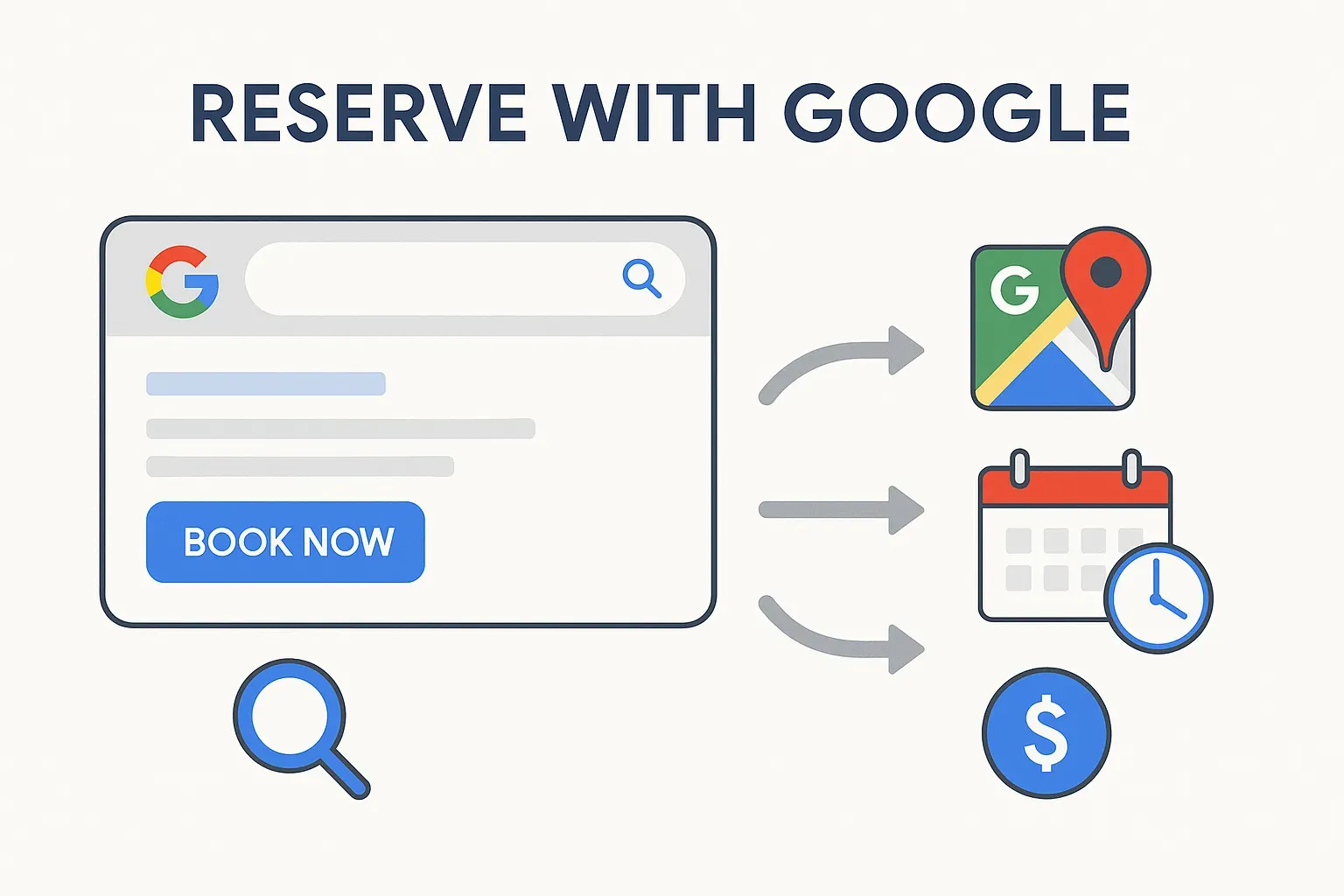
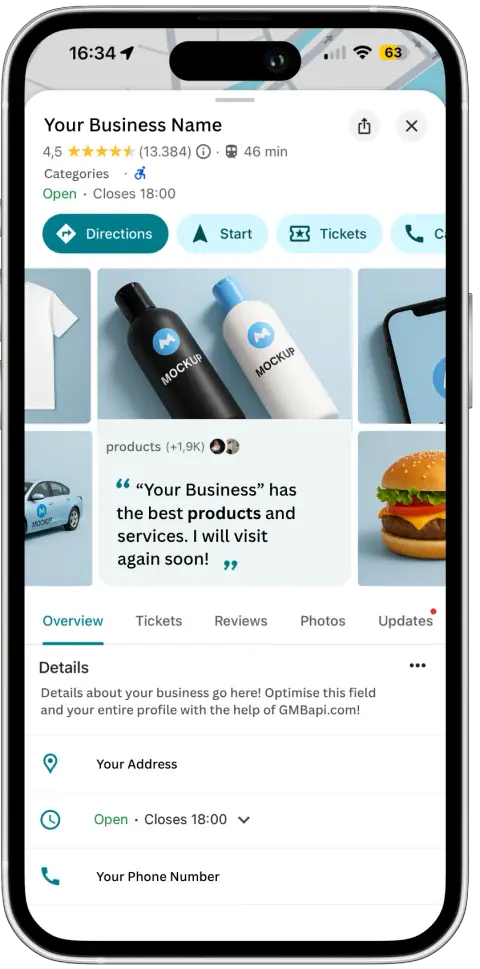
Reserve with Google is a booking feature built into Google's Action Center. It puts a direct booking button on your Google Business Profile, appearing in Google Search and Google Maps. A customer taps the button and is routed straight to your own booking system to see availability, pick a time, and confirm, rather than to an aggregator that would otherwise sit between them and your business and take a share of the fee along the way.
What is Reserve with Google?
Think of it as a bridge between your business and Google’s user base. For each location, we publish your booking link, service, and starting price to Google’s Action Center, and Google shows a Book button that opens your booking page.
Whether you run a fitness studio, salon, car park, home service, or tour business, Reserve with Google connects your services to customers at the exact moment they’re ready to act.
How does Reserve with Google work?
- Connect your booking page. We work with you as an approved Reserve with Google partner: we check your eligibility and booking page, and handle the technical setup.
- Publish your booking data. We sync the booking link, service, and starting price for each location, and keep them current on Google.
- Get discovered and booked. A customer finds your business, taps the booking button, and completes the booking on your own site.
Key Benefits for Your Business
Expanded Reach
Get discovered by people actively searching for your services, right at the decision-making moment. From "hair salon near me" to "book yoga class," your business can appear with an instant booking option attached.
A Shorter Path to Booking
Fewer steps between discovery and confirmation means fewer customers dropping off partway through. A large, visible booking button takes customers straight to the right booking page.
Direct, High-Value Conversions
The Action Center turns search intent into action:
Appointments & Bookings
Salons, spas, fitness studios, personal trainers
Parking & Home Services
Reserve a space, or book a quote or inspection
Tours & Activities
Guided experiences and attractions

“Since implementing the Google Action Center, we've seen a remarkable lift in performance. New users from Google Maps increased by more than 35%, and daily purchases jumped by over 38%. The real win goes beyond the numbers; the customer journey is now smoother than ever. The Action Center is proving to be a real growth driver for ParkBee.”
Joost Heetla
Managing Director of ParkBee
How to Add a Book Now Button to Google Business Profile
There are three different ways to get a booking link onto your profile, and they're not all equal.
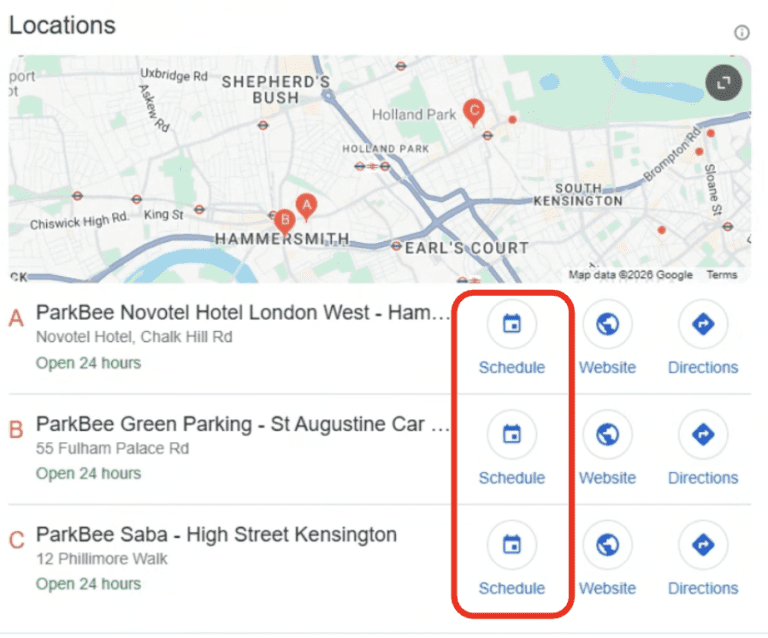
The Google Action Center integration (what most people mean by Reserve with Google) is Google's most prominent call-to-action space, a large button on your Business Profile. It's only available through a short list of trusted Google partners (including GMBapi), and it routes bookings directly to your own site rather than an aggregator. It provides a main action button plus service-specific booking buttons under your services section.
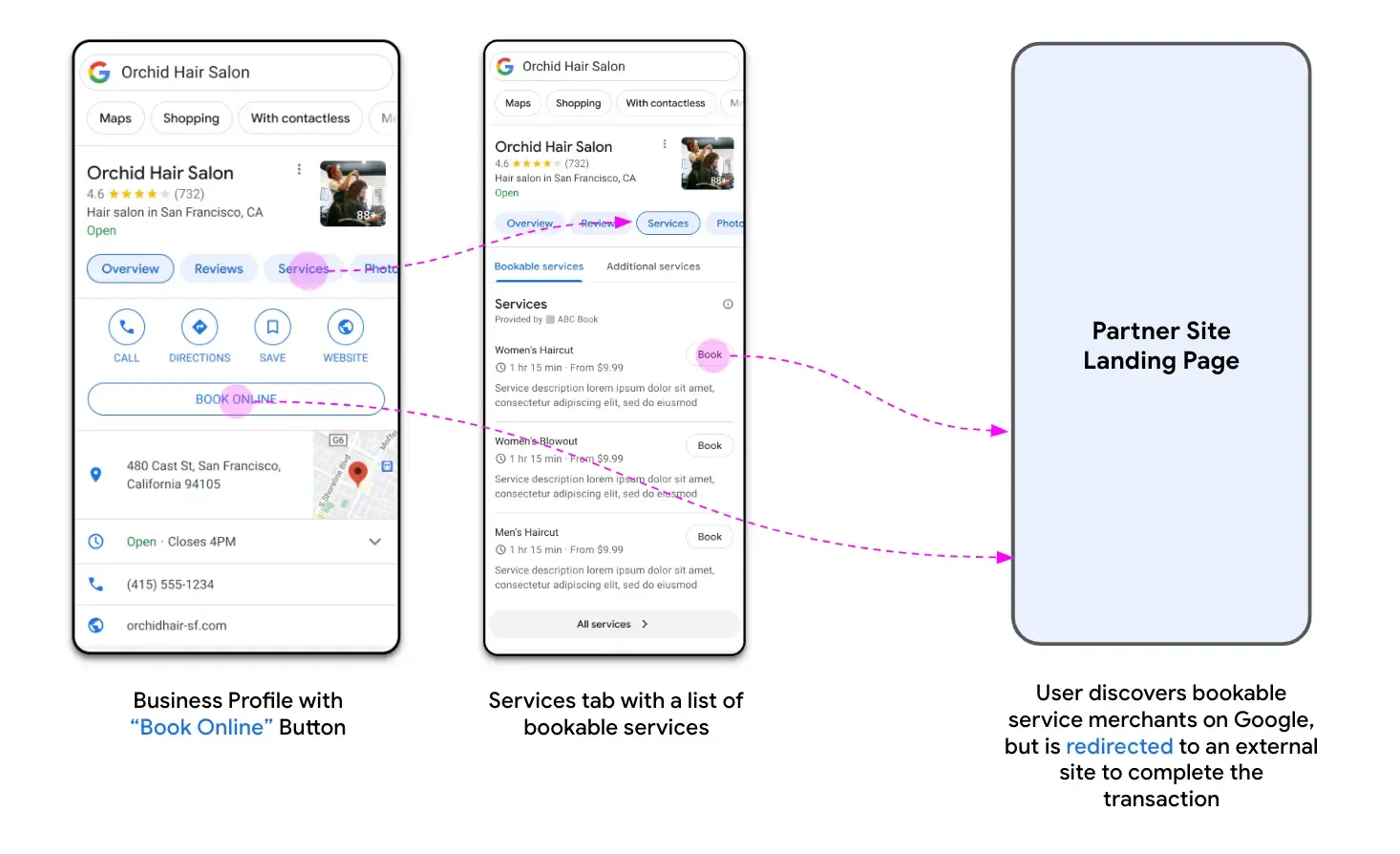
The Place Action Link has medium prominence, appearing as a clickable link on the profile. It can be added manually through the GBP dashboard, depending on your business category, and works as a direct shortcut to reservations, orders, or menus.
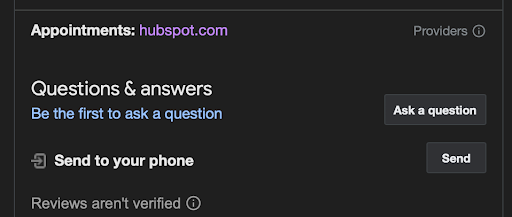
The Attribute Link, such as an Appointment Link, is the simplest to add: just a URL field under attributes. In testing, it shows the lowest visibility and doesn't always appear on the profile at all.
In short: Place Action and Attribute Links are the easiest to set up yourself. A genuine Google Book Now button, through the Action Center, requires a trusted partner, detailed service information, and a booking page that meets Google’s requirements
“The reserve channel is exceeding bookings from the old appointment link by 105%”
Joost Heetla
Managing Director of ParkBee
The Power of Reserve with Google
Reserve with Google removes steps between a search and a booking. Customers go straight to the right booking page instead of navigating menus and filling in forms.
Customers pick a time and confirm on your booking page, which turns more ready-to-buy searchers into confirmed bookings before they check a competitor’s listing.
ParkBee, a parking garage operator, saw daily purchases rise 38.3% and new users from Google Maps rise 35.5% after launch, compared with before. Read the ParkBee case study.
Reserve with Google Partners
Reserve with Google isn't something you switch on yourself. Google works through a short list of approved partners, GMBapi among them, who set up the integration on your behalf. A partner connects your booking pages to Google’s Action Center, publishes the booking link, service, and starting price for each location, and keeps your Book button live and accurate as things change.
Working with a Reserve with Google partner matters most if you want bookings routed to your own site directly, rather than through an aggregator that takes a percentage of each booking fee. If margin matters to your business, who you integrate through matters as much as whether you integrate at all.
Agencies and booking platforms. If you manage booking links for clients, or run a booking platform whose customers want a Book button, we can set up Reserve with Google across their locations from one template. White-label is included at no extra cost, so you can offer it under your own brand. Talk to us about reselling it.
Reserve with Google API
Google also offers a full end-to-end integration through its Actions Center API, where the booking is completed inside Google. That’s built for booking platforms and isn’t what GMBapi provides. We run the redirect integration, where customers book on your own site.
Reserve with Google Setup
Setup takes around three weeks, including Google’s review, and runs in four steps:
Check.
We confirm your categories are eligible and review your booking page against Google’s requirements.
Sync.
You add the booking link, service, and starting price for each location to our template.
Test.
We run test bookings in a sandbox and add conversion tracking with Google Tag Manager. Once the test bookings are validated, we move to production.
Go live.
The Book button appears, and we monitor the first days.
After that, the template is the source of truth. Changes to booking links, services, or prices reach Google within one to several days.
Your booking page needs to meet six requirements. This is where most projects get stuck:
- One domain. All booking pages sit on one domain, which also hosts your sign-up and terms pages.
- A page per location. The button opens a page for that location, with its address above the fold.
- Flow pre-selected. The first booking step is pre-selected, with bookable services above the fold. Asking first for a key detail, such as a zip code or vehicle make, is fine.
- Price up front. Show the lowest possible price, or “Free”. Service, time slot, and final price appear in one view, with no extra click or pop-up.
- No login or payment wall. The first step can’t require an account or payment details.
- Complete it on the page. No phone call, other site, or app needed. No homepages or generic pages.
Pricing. Setup is a one-off €1,000 / $1,000. The add-on is €2 / $2 per location per month, on top of your Essential plan. Prices exclude VAT, and Essential pricing drops per location as you grow (see the pricing page). White-label for agencies comes at no extra cost.
Where Reserve with Google Works Best
Reserve with Google is widely adopted across sectors where convenience and instant bookings drive customer decisions:
Beauty & Personal Care
Hair salons, barber shops, nail salons, spas, and massage therapists frequently use Reserve with Google to let customers book appointments directly from Search or Maps.
Fitness & Wellness
Gyms, yoga studios, Pilates studios, and personal trainers use it to let clients book classes, training sessions, or wellness services.
Parking
Car park operators use it to let drivers reserve a space. ParkBee is our best-documented example.
Tours & Activities
Businesses offering tours, activities, attractions, city tours, boat cruises, cooking classes, and museums use it to let customers book directly.
Home Services
While some home services aren't supported, certain non-regulated services, pet grooming, car washes, and home cleaning, can use Reserve with Google to schedule appointments.
Restaurants usually don’t need the add-on, because Google can show a booking button on restaurant profiles from a booking link. Google decides which categories are eligible, so we check eligibility before you commit.
FAQ About Reserve with Google
Reserve with Google is a feature within the Google Action Center that adds a Book button to your Google Business Profile in Google Search and Google Maps. Customers tap it and book on your own website, on the booking page for that location.
Google doesn’t charge businesses to use Reserve with Google. GMBapi charges a one-off setup fee of €1,000 / $1,000 and an add-on of €2 / $2 per location per month, on top of your Essential plan. Prices exclude VAT. We offer it to GMBapi customers.
By removing steps between discovery and booking, it gives customers fewer places to drop off. After launch, ParkBee saw daily purchases rise 38.3% and new users from Google Maps rise 35.5%. Results depend on your booking page and category.
No. We set up the integration and the conversion tracking with you. You need a booking page that meets Google’s requirements, as listed in the setup section.
Google does not publish a single, comprehensive public list of all its partners in an easy-to-read format. However, you can find a list of many of the integration partners here.
You can’t add the Action Center button yourself. It’s set up through an approved partner such as GMBapi, and it appears once Google approves the integration, usually around three weeks after kick-off. That needs a supported category and a booking page that meets the six requirements. To add a booking link yourself, Place Action Links and Attribute Links are the manual options.
The requirements are about your booking page, not about building an API integration. It needs to sit on one domain, open a page for each location with its address above the fold, show bookable services and the price up front, and let customers complete the booking without logging in, paying first, or leaving the page.
Setup takes around three weeks, including Google’s review, and runs in four steps:
- Check. We confirm your categories are eligible and review your booking page against Google’s requirements.
- Sync. You add the booking link, service, and starting price for each location to our template.
- Test. We run test bookings in a sandbox and add conversion tracking with Google Tag Manager. Once the test bookings validate, we move to production.
- Go live. The Book button appears, and we monitor the first days.
Google decides which categories are eligible, and the list changes, so we check eligibility for you before you commit. Good fits include fitness and wellness studios, salons, parking, home services, and tours. Memberships and subscriptions, regulated goods and services, and mobile businesses without a fixed location aren’t eligible. Google’s Actions Center documentation lists the supported verticals.
Start growing with GMBapi
Leverage AI to manage reviews, bulk publish content while ensuring consistency across all your local platforms. Stay ahead by monitoring competitors & showcasing what makes you stand out.
Our Transparent Pricing
EXPLORE PLANSHow Our Clients Keep Winning
SUCCESS STORIESHave any questions?
Feel free to contact us!
Trusted By

%20--%3e%3csvg%20version='1.1'%20id='Layer_1'%20xmlns='http://www.w3.org/2000/svg'%20xmlns:xlink='http://www.w3.org/1999/xlink'%20x='0px'%20y='0px'%20viewBox='0%200%20229%2033'%20style='enable-background:new%200%200%20229%2033;'%20xml:space='preserve'%3e%3cstyle%20type='text/css'%3e%20.st0{fill-rule:evenodd;clip-rule:evenodd;fill:%23ffffff;}%20.st1{fill:%23ffffff;}%20%3c/style%3e%3cg%3e%3cg%3e%3cpath%20class='st0'%20d='M166.4,6c0.1-2.2-1.7-3.2-3.7-2.8c-1.8,0.3-3.6,1.9-5,3.4v0c-0.5,0.6-1,0-1,0l0,0c-1.4-1.5-3.2-3.1-5-3.4%20c-1.9-0.4-3.7,0.6-3.7,2.8c0.1,3.9,4.8,3.9,7.7,2.4c-2.1,1.9-4.3,4.4-6.2,3.4c0,0,0,0-0.1-0.1c0.4-0.1,0.6-0.4,0.6-0.8%20c0-0.4-0.4-0.7-0.8-0.7c-0.4,0-0.7,0.4-0.7,0.9c0,0.2,0.1,0.3,0.2,0.4h0c2.7,2.9,6.3-1.5,8.3-3.8c0,0,0.1,0,0.1,0c0,0,0.1,0,0.1,0%20c2,2.3,5.6,6.8,8.3,3.9h0c0.1-0.1,0.2-0.3,0.2-0.4c0-0.4-0.3-0.8-0.7-0.9c-0.4,0-0.8,0.3-0.8,0.7c0,0.4,0.2,0.7,0.6,0.8%20c0,0-0.1,0.1-0.1,0.1c-1.9,1-4.1-1.4-6.2-3.4C161.6,9.9,166.3,9.9,166.4,6z%20M150.6,7.5c-3.1-2,0.5-6.8,6.3-0.2%20C156.9,7.3,153.7,9.4,150.6,7.5z%20M157.6,7.3c5.7-6.6,9.3-1.7,6.3,0.2C160.8,9.4,157.6,7.3,157.6,7.3z'/%3e%3c/g%3e%3cg%3e%3cpath%20class='st1'%20d='M0,0.7V0h3.7v17.9h0.1c1.1-2.1,3.4-4.5,6.6-4.5c4.7,0,6,2.4,6,5v14.1h-3.7V17.3c0-2.4-1.2-3.2-2.6-3.2%20c-3.7,0-5.6,3.7-6.4,5.2v13.2H0V0.7z'/%3e%3cpath%20class='st1'%20d='M24.7,14.1v-0.7h3.7v15.8c0,1.9,1.1,3.1,2.7,3.1c3.1,0,5.8-3.5,5.8-6.8V14.1v-0.7h3.7v19.1H37v-4h-0.1%20c-0.4,1-2.2,4.6-6.2,4.6c-4.4,0-6-2.3-6-4.9V14.1z'/%3e%3cpath%20class='st1'%20d='M49,15.1v-1.7h3.7v4.5h0.1c1.1-2.1,3.3-4.5,6.6-4.5c4.7,0,6,2.4,6,5v14.1h-3.7V17.3c0-2.4-1.2-3.2-2.6-3.2%20c-3.7,0-5.6,3.7-6.4,5.2v13.2H49V15.1z'/%3e%3c/g%3e%3cpolygon%20class='st1'%20points='72.1,0%2075.8,0%2075.8,24.6%2086.4,14.4%2087.7,14.4%2080.1,21.5%2088.9,32.5%2084.1,32.5%2077.4,24.1%2075.8,25.6%2075.8,32.5%2072.1,32.5%20'/%3e%3cg%3e%3cpath%20class='st1'%20d='M96.2,25.6c0,3.1,0.4,6.7,4.5,6.7c3.7,0,6.4-2.5,7-6.1h0.7c-0.7,4.1-3.7,6.8-7.8,6.8c-5.2,0-8.8-4-8.8-9.8%20c0-4.3,3.4-9.8,8.2-9.8c5.2,0,7.9,5.8,7.9,7.7c0,0.3-0.1,0.4-0.4,0.4H96.2V25.6z%20M103.9,19.5c0-2.8-0.8-5.4-3.7-5.4%20c-3.1,0-4,2.6-4,5.4v1.2h7.4c0.2,0,0.3-0.1,0.3-0.3V19.5z'/%3e%3cpath%20class='st1'%20d='M113.6,32.5V14.1v-0.7h3.7v4.3h0.1c1.2-2.2,3-4.3,6.3-4.3c2.8,0,5.6,0.8,6,4.7h0.1c0.9-2.5,3.1-4.8,6.4-4.7%20c4.5,0,6,2.6,6,5.4v13.7h-3.7V18c0-3.2-1.4-3.9-3.1-3.9c-2.6,0-4.8,2.8-5.7,5.9v12.5H126V17.1c0-2.2-1.1-3-2.9-3%20c-2.6,0-4.6,2.1-5.9,5.2v13.2H113.6z'/%3e%3cpath%20class='st1'%20d='M157.3,13.4c5.7,0,9.3,4.7,9.3,9.8c0,5.1-3.7,9.8-9.3,9.8c-5.7,0-9.3-4.7-9.3-9.8%20C147.9,18.1,151.6,13.4,157.3,13.4%20M162.4,21.5c0-3.8-0.2-7.4-5.1-7.4c-4.9,0-5.1,3.5-5.1,7.4v3.4c0,3.8,0.2,7.4,5.1,7.4%20c4.9,0,5.1-3.5,5.1-7.4V21.5z'/%3e%3c/g%3e%3cpolygon%20class='st1'%20points='172.6,0.7%20172.6,0%20176.3,0%20176.3,32.5%20172.6,32.5%20'/%3e%3cpolygon%20class='st1'%20points='184.8,0.7%20184.8,0%20188.5,0%20188.5,32.5%20184.8,32.5%20'/%3e%3cg%3e%3cpath%20class='st1'%20d='M198.7,25.6c0,3.1,0.4,6.7,4.5,6.7c3.7,0,6.4-2.5,7-6.1h0.7c-0.7,4.1-3.7,6.8-7.8,6.8c-5.2,0-8.8-4-8.8-9.8%20c0-4.3,3.4-9.8,8.2-9.8c5.2,0,7.9,5.8,7.9,7.7c0,0.3-0.1,0.4-0.4,0.4h-11.5V25.6z%20M206.4,19.5c0-2.8-0.7-5.4-3.7-5.4%20c-3.1,0-4,2.6-4,5.4v1.2h7.4c0.2,0,0.3-0.1,0.3-0.3V19.5z'/%3e%3cpath%20class='st1'%20d='M216.6,15.1v-1.7h3.7v5.2h0.1c0.5-2,2.1-5.2,5.7-5.2c1.6,0,2.9,1.1,2.9,2.6c0,1.1-0.7,2.1-2,2.1%20c-1.5,0-1.9-0.8-1.9-1.9c0-1,0.5-1.6,1-1.9c-0.2-0.1-0.4-0.1-0.6-0.1c-1.8,0-5.1,2.9-5.1,8.6v9.8h-3.7V15.1z'/%3e%3c/g%3e%3c/g%3e%3c/svg%3e)

'%3e%3c/path%3e%3cpath%20d='M27.28,30.32H22.72V18.87a2.26,2.26,0,0,1,.67-1.62l6.75-6.75a2.25,2.25,0,0,1,1.62-.67H43.22v4.56H30.69a3.42,3.42,0,0,0-3.42,3.42Z'%20transform='translate(0%20-0.18)'%3e%3c/path%3e%3cpath%20d='M63.8,9.82h3.52V13h.08a6.24,6.24,0,0,1,5.34-3.66,10.69,10.69,0,0,1,2.49.28V13a5.6,5.6,0,0,0-2.09-.36c-3.38,0-5.59,3.22-5.59,8.37v9.33H63.8Z'%20transform='translate(0%20-0.18)'%3e%3c/path%3e%3cpath%20d='M179.24,22.35c0,3.09-2,5.44-5.7,5.44-1.72,0-3.81-1.18-3.81-3.36,0-3.65,5.06-4,7.1-4,.8,0,1.6.08,2.41.08Zm-11-7.87a9.52,9.52,0,0,1,5.94-2.13c3.77,0,5.05,1.84,5.05,5.38-1.48-.08-2.53-.08-4-.08-3.89,0-9.52,1.6-9.52,6.75,0,4.5,3.1,6.42,7.51,6.42a7.6,7.6,0,0,0,6.34-3.11h.08v2.61H183V17.79c0-5.6-2.36-8.47-8.21-8.47A13.1,13.1,0,0,0,168,11.24Z'%20transform='translate(0%20-0.18)'%3e%3c/path%3e%3cpath%20d='M88,22.35c0,3.09-2,5.44-5.7,5.44-1.73,0-3.81-1.18-3.81-3.36,0-3.65,5.06-4,7.1-4,.8,0,1.6.08,2.41.08ZM77,14.48A9.52,9.52,0,0,1,83,12.35c3.77,0,5.06,1.84,5.06,5.38-1.48-.08-2.53-.08-4-.08-3.89,0-9.52,1.6-9.52,6.75,0,4.5,3.1,6.42,7.51,6.42a7.6,7.6,0,0,0,6.34-3.11h.08v2.61H91.8V17.79c0-5.6-2.36-8.47-8.21-8.47a13.1,13.1,0,0,0-6.74,1.92Z'%20transform='translate(0%20-0.18)'%3e%3c/path%3e%3cpath%20d='M94.88,9.82h3.64V13h.08a7.39,7.39,0,0,1,6.73-3.72c5.31,0,7.66,3.28,7.66,8.79V30.32h-3.76V19.69c0-4.79-1-7.13-4.35-7.33-4.31,0-6.24,3.47-6.24,8.48v9.48H94.88Z'%20transform='translate(0%20-0.18)'%3e%3c/path%3e%3cpath%20d='M137.55,26.33a10.06,10.06,0,0,0,4.7,1.45c1.72,0,3.85-.73,3.85-2.95,0-3.76-8.87-3.43-8.87-9.21,0-4.27,3.18-6.31,7.23-6.31a15.49,15.49,0,0,1,4.7.81l-.32,3.27a11,11,0,0,0-4-1.05c-1.92,0-3.61.81-3.61,2.51,0,4.2,8.87,3,8.87,9.58,0,4.39-3.5,6.39-7.15,6.39a11.84,11.84,0,0,1-5.62-1.12Z'%20transform='translate(0%20-0.18)'%3e%3c/path%3e%3cpath%20d='M164.48,12.85h-5.43V24.11c0,2.38,1.45,3.67,3.17,3.67a4.65,4.65,0,0,0,2.57-.73v3.2a11.94,11.94,0,0,1-3.21.56c-3.89,0-6.29-1.83-6.29-5.94v-12h-4.62v-3h4.62V5.08l3.76-1.2V9.82h5.43Z'%20transform='translate(0%20-0.18)'%3e%3c/path%3e%3cpath%20d='M189.56,20c-.08-3.76,1.53-7.64,5.62-7.64s6.06,3.92,6.06,7.76c0,3.43-1.77,7.68-6,7.68C191.17,27.79,189.48,23.22,189.56,20ZM201.4,30.32H205V.18h-3.76V12.6h-.08C200,10.72,198,9.32,194.38,9.32c-5.94,0-8.84,4.85-8.84,10.37s2.61,11.13,8.8,11.13a8.22,8.22,0,0,0,7-3.36h.08Z'%20transform='translate(0%20-0.18)'%3e%3c/path%3e%3cpath%20d='M119.57,20c-.08-3.76,1.53-7.64,5.62-7.64s6.06,3.92,6.06,7.76c0,3.43-1.77,7.68-6,7.68C121.17,27.79,119.48,23.22,119.57,20Zm11.84,10.33H135V.18h-3.76V12.6h-.08C130,10.72,128,9.32,124.38,9.32c-5.94,0-8.84,4.85-8.84,10.37s2.61,11.13,8.8,11.13a8.22,8.22,0,0,0,7-3.36h.08Z'%20transform='translate(0%20-0.18)'%3e%3c/path%3e%3c/svg%3e)